DJI Thermal Analysis Tool vs HeatScribe: From Thermal Images to Professional Inspection Reports
DJI Thermal Analysis Tool 3 provides the essential tools for examining DJI thermal images. You can measure temperatures, adjust analysis parameters, change palettes and export reports.
For a working thermographer, however, the job involves considerably more than reading temperatures.
You need to compare a thermal anomaly against an appropriate reference, assess its significance, identify the affected asset, organize supporting evidence and communicate your findings to your client. You also need a reporting process you can repeat efficiently across inspections.
HeatScribe was built around that complete workflow, by a working thermographer. Its value lies in connecting thermal analysis, inspection organization, findings and reporting in one application.
This comparison looks at those differences and when DJI’s free tool may already meet your needs.


Delta T Analysis Is Built In
An absolute temperature rarely tells the whole story.
A component measuring 55°C may be operating normally, or it may warrant investigation. Its significance depends on the equipment, loading, environment and how it compares with an appropriate reference.
That comparison is central to many professional thermographic inspections. Delta T, the temperature difference between the area of interest and a reference, helps the inspector assess and communicate the anomaly.
DJI Thermal Analysis Tool provides temperature measurements, but its documented workflow does not include an equivalent integrated reference-to-hotspot, Delta T and finding-priority system. Taking two readings is possible; carrying that comparison through the assessment and report is additional work. DJI user guide.
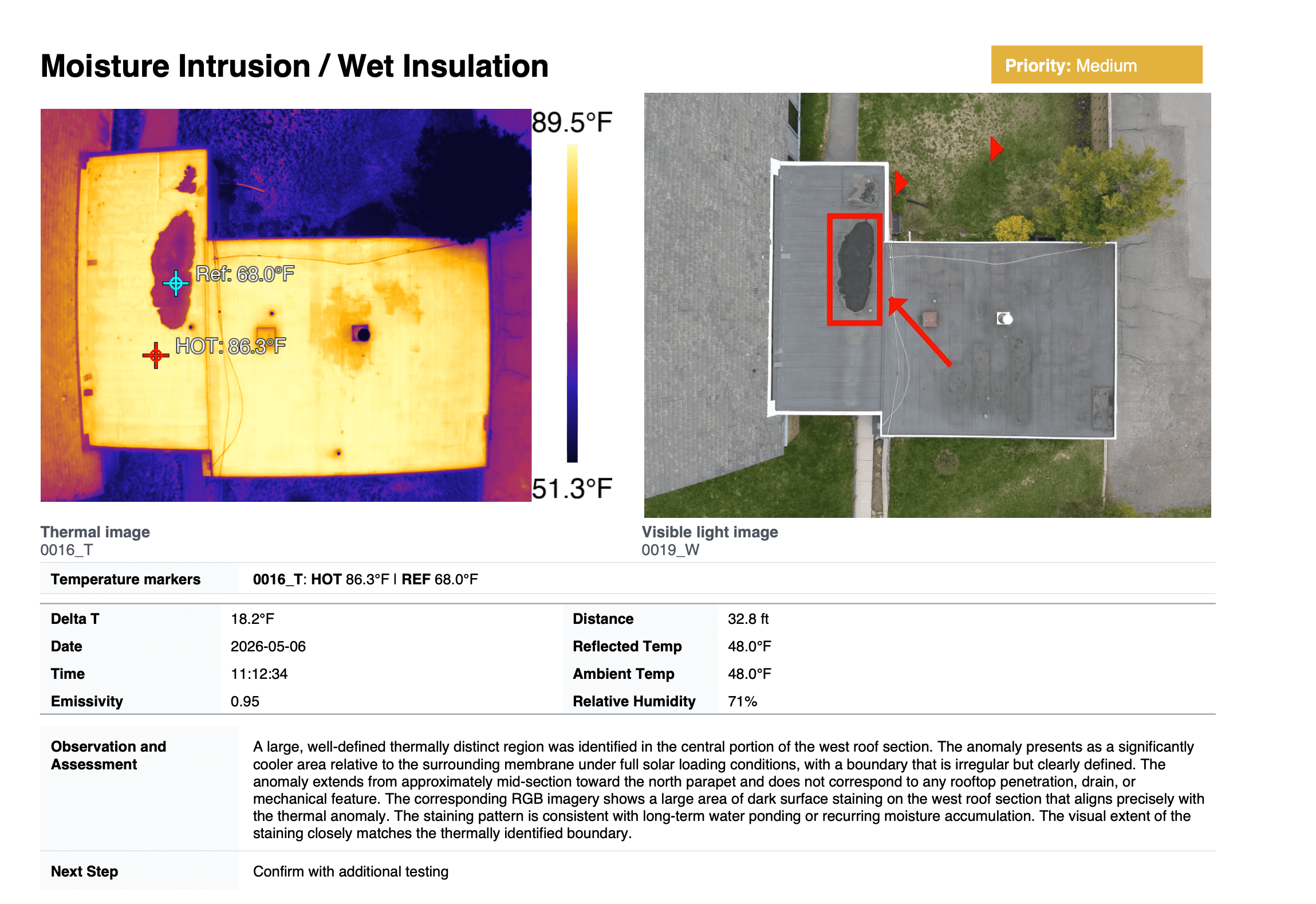
In HeatScribe, Delta T is a core part of the workspace. Set the reference and hotspot measurements, review the calculated difference and carry the result into the finding and report.
Built-in priority rules support consistent classification, with manual overrides when professional judgment requires a different assessment. The Pro version adds customization of those rules through finding templates.
This keeps the measurements, comparison and assessment connected. You do not have to calculate a difference separately and then transcribe it into another document.


Organize the Job Around the Assets You Inspected
A large inspection can contain hundreds of images covering different buildings, equipment types, locations and operating conditions.
Working through that job using filenames alone can be tedious. You need to know which images belong together, which have associated findings and which should appear in the final report.
DJI’s tool provides folder navigation, sorting, searching and temperature-based filtering. HeatScribe adds an inspection structure through named, color-coded image groups.
For example, an electrical inspection might have separate groups for conductors, transformers, or individual poles. A roof inspection might be organized by roof section or inspection area.
Those groups give the job a recognizable structure while you work. You can return to a particular asset or area without reconstructing the inspection from a list of image filenames.
Groups and findings serve different purposes: groups organize the inspection; findings document the conditions you want to assess and communicate with your client. They make it easier to manage a large job without treating every image as a separate report item.
Drag-and-drop organization on the image grid lets you arrange images within groups and findings, while report-inclusion controls keep supporting evidence separate from images you do not intend to deliver to your client.

Workflow Improvements
Professional software should reduce repetitive work.
HeatScribe lets you keep thermal and visible-light evidence together, use meaningful finding names and custom field labels, and control which images are included in the report.
Custom temperature labels let you identify a measurement by the component or location it represents. A meaningful name is more useful to the inspector and client than an unexplained collection of generic measurement labels.
Labels can also be repositioned independently, keeping readings legible without moving the measurement itself. Adjustable label backgrounds, cropping and annotations help direct attention to the relevant condition.
When one image contains several issues, you can duplicate its inspection entry and use it in separate findings. Each copy can have its own measurements, analysis settings and assessment while referencing the same source image.
Saved client, inspector and equipment profiles reduce repeated data entry between jobs. Select a saved client to load their details and company logo into the inspection and report. Automatic weather lookup can retrieve conditions for the inspection time and location.
Individually, these may look like small conveniences. Across hundreds of images and repeated inspections, they affect how much time you spend managing the software instead of assessing the inspection.
They also improve the deliverable. Clear labels, readable measurements and well-chosen supporting photographs help a client understand what they are looking at.

Build Findings While You Analyze

A professional finding needs more than a thermal image and a temperature.
It needs to identify the asset or location, describe the observed condition, present the supporting evidence and explain the assessment or recommended next step.
HeatScribe lets you build that finding while the imagery and measurements are in front of you. Assign the relevant images, record the details, review the Delta T and set the priority in the same workflow.
This avoids leaving the reasoning until the reporting stage, when you may otherwise be trying to remember why a particular image was important.
The resulting report is built from documented findings, rather than a collection of images that still needs to be interpreted and assembled elsewhere.
Start With a Professional Report Structure

DJI Thermal Analysis Tool can generate PDF and DOC reports, including batch exports. The distinction is not whether it can produce a report, but how well its output fits your professional reporting requirements.
HeatScribe includes inspection-specific report templates with pre-filled sections covering subjects such as inspection scope, limitations and interpretation, and severity guidance. These sit alongside inspection information, summaries, a findings index and the detailed findings themselves.
That gives you a practical starting point based on established thermographic reporting conventions. You are not beginning each job with an empty document or remembering which standard sections to copy from the previous report.
The report brings together inspection details, thermal and visible imagery, measurements, Delta T results, priorities and supporting information.
You still review the wording and ensure it accurately describes the work performed. A template supports a complete report; it does not automatically establish compliance with every standard or client specification.
View a sample HeatScribe inspection report.
Customizable Report Templates

A working thermographer may need different deliverables for electrical, mechanical, building-envelope and roof inspections. Individual clients can also have their own requirements.
HeatScribe Pro provides extensive control over that reporting process.
You can customize report sections and headings, add narrative content, define custom fields and labels, and choose the information appropriate to the inspection. Finding templates and inspection types let you adapt how information is collected as well as how it is presented.
Template management makes that customization reusable. Create and save a reporting format, duplicate it for another inspection type or client, and maintain the versions you use in your practice.
Pro also provides dedicated building and roof data sheets and finding image-location maps for inspections that benefit from that additional context.
Instead of repeatedly rebuilding a report, you establish a consistent starting point for each kind of work.
Standard includes the built-in inspection and reporting workflows. Pro adds the tools to develop and manage your own.
Deliver Findings in the Format the Client Needs
The finished PDF is not always the only deliverable.
A client may need a spreadsheet of findings to distribute internally, track follow-up work or incorporate into an existing asset-management process.
HeatScribe can export a CSV findings register containing structured inspection information, asset and location details, priorities, observations, assessments and recommended next steps. Populated custom finding fields can be included as well.
This gives the client usable information without requiring someone to manually extract it from the PDF.
You can also export an individual finding sheet when you need to share a specific issue without sending the complete inspection report.
DJI’s DOC export remains a useful distinction for users who specifically require an editable Word document. HeatScribe’s report output is PDF, with CSV providing a separate structured findings deliverable.
Save the Inspection, Not Just the Finished PDF
The first report export is not always the end of the job.
A client may ask for clarification, an additional photograph or a revised assessment. You may need to revisit the inspection months later.
HeatScribe saves the inspection’s organization, measurements, findings and report configuration so you can reopen the job and continue working. Analysis settings are stored separately from the original images.
Autosave and inspection recovery help protect work during an interrupted session. If source images have been moved, missing-image relinking provides a way to restore their references without rebuilding the inspection.
DJI’s tool saves measurement and palette information into the R-JPEG itself; its manual warns that saving overwrites the original image and recommends making a backup.
For professional recordkeeping, separating original captures from the working inspection is a useful distinction. Both the source images and saved inspection should remain part of your backup process.
Platform and Language Support
DJI Thermal Analysis Tool 3 is available for Windows.
HeatScribe is available for Windows and for Apple Silicon Macs. Its interface is available in English and German.
For Mac-based thermographers, HeatScribe provides a direct analysis and reporting workflow without maintaining a separate Windows environment.
Which Application Fits Your Work?
DJI Thermal Analysis Tool is a reasonable choice when you need DJI image analysis and its available report format meets your requirements.
HeatScribe is geared toward professionals who need to manage the complete inspection: reference-based Delta T analysis, organized image groups, structured findings, clear supporting evidence and repeatable client reporting.
Custom labels, reusable profiles, template management, CSV export and saved inspection projects address the practical work that surrounds the temperature measurements.
The reason to choose HeatScribe is not simply to obtain another set of measurement tools. It is to keep the analysis, professional assessment and finished deliverable connected throughout the job.
Explore HeatScribe and try it free.
This article is published by HeatScribe. HeatScribe is an independent product, not affiliated with or endorsed by DJI.